Headless CMS Solutions
Professional headless cms solutions services tailored to your business needs.
Write once,
publish
everywhere
Your content is an asset, not a webpage.
Why teams go headless
Headless, in one sentence
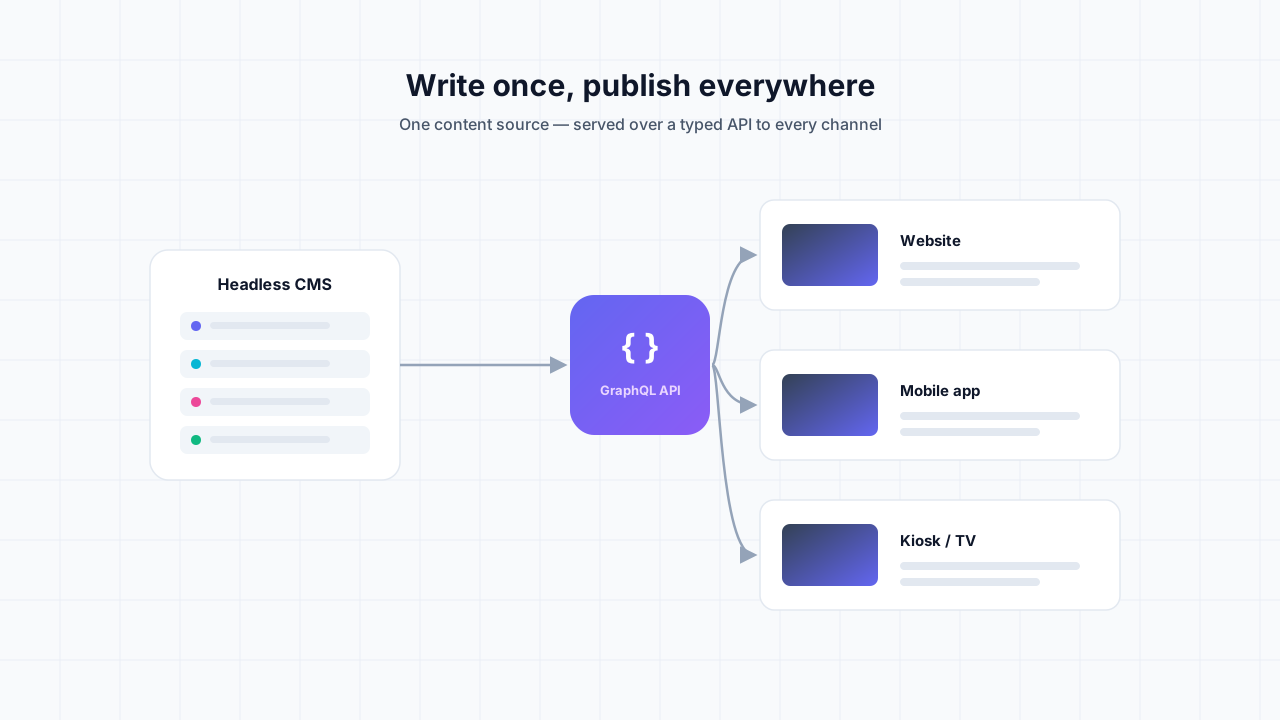
A headless CMS separates where content is managed from where it is shown. Editors work in a clean back end; the content is served over an API; and any number of front ends — website, mobile app, kiosk, smartwatch, partner integration — read from that single source.
That split is what makes it fast and future-proof. The public site can be statically generated and served from a CDN, while the admin can evolve independently. Redesign the front end without re-entering content. Add a channel without duplicating work.
What you gain
- Omnichannel content
One content base feeds web, app, and any future surface via API.
- Blazing performance
Statically generated front ends served from the edge — sub-second loads.
- Smaller attack surface
No monolithic admin exposed on your public site to exploit.
- Best-of-breed stack
Pick the right CMS, framework, and host for the job — they’re decoupled.
- Independent front ends
Redesign or rebuild the UI without touching the content layer.
- Developer velocity
Typed APIs, Git workflows, and previews make shipping fast and safe.
// One source of truth, consumed anywhere
const { products } = await cms.query(`
  query {
    products(where: { status: PUBLISHED }) {
      title
      slug
      price
      gallery { url alt }
    }
  }
`);

// → website (Astro / Next), mobile app, kiosk, partner API…
// all reading the same content over a typed GraphQL endpoint.How we work
From content chaos to clean API
01
Model
Define content types and relationships independent of any one layout.
02
Choose the stack
Pick the CMS and front-end framework that fit your team and budget.
03
Build
Wire the API to a static-first front end with preview and build hooks.
04
Migrate & launch
Import existing content, set redirects, and ship to the edge.
Headless vs. traditional CMS
Traditional (coupled) | Headless (decoupled) | |
|---|---|---|
| Front ends | One (the website) | Unlimited |
| Performance | Server-rendered each hit | Static, edge-cached |
| Security | Admin on public site | Admin isolated |
| Redesigns | Risky, tied to content | Front end only |
| Scaling | Vertical, costly | CDN, cheap |
| Stack choice | Locked together | Best-of-breed |
- Front endsOne (the website)
- PerformanceServer-rendered each hit
- SecurityAdmin on public site
- RedesignsRisky, tied to content
- ScalingVertical, costly
- Stack choiceLocked together
- Front endsUnlimited
- PerformanceStatic, edge-cached
- SecurityAdmin isolated
- RedesignsFront end only
- ScalingCDN, cheap
- Stack choiceBest-of-breed
Frequently asked
Which headless CMS do you recommend?+
It depends on your team and content. We work with Sanity, Payload, Strapi, and Contentful, among others, and recommend based on editor needs, hosting, and budget — not a one-size-fits-all favorite.
Can editors still preview content?+
Yes. We wire up live preview so editors see draft changes on the real front end before publishing — a common worry with headless, and a solved one.
What front-end frameworks do you use?+
Mostly Astro and Next.js for static-first, fast sites. The decoupled architecture means the front end is a free choice.
Can it power our mobile app too?+
That is the core benefit. The same content API feeds your website, mobile app, and any other channel from one source of truth.
Can we migrate from WordPress or a traditional CMS?+
Yes. We model your content, import it into the new headless CMS, and set up redirects so SEO carries over.
Is headless overkill for a simple site?+
Sometimes. If you have one website and no other channels, a lighter setup may be better — we will tell you honestly rather than over-engineer.
Set your
content free
Tell us what you publish and where it needs to go. We’ll recommend a headless stack and a migration plan.
Discuss your setup